Network Setup for AoIP Functionality: FreeSpeak IPTs and IrisX Panels
Clear-Com AoIP devices need careful setup of IP settings as the E-IPA card uses up to three IP addresses. It also requires careful setup of network switches. For details see Clear-Com AoIP Network Recommendations.
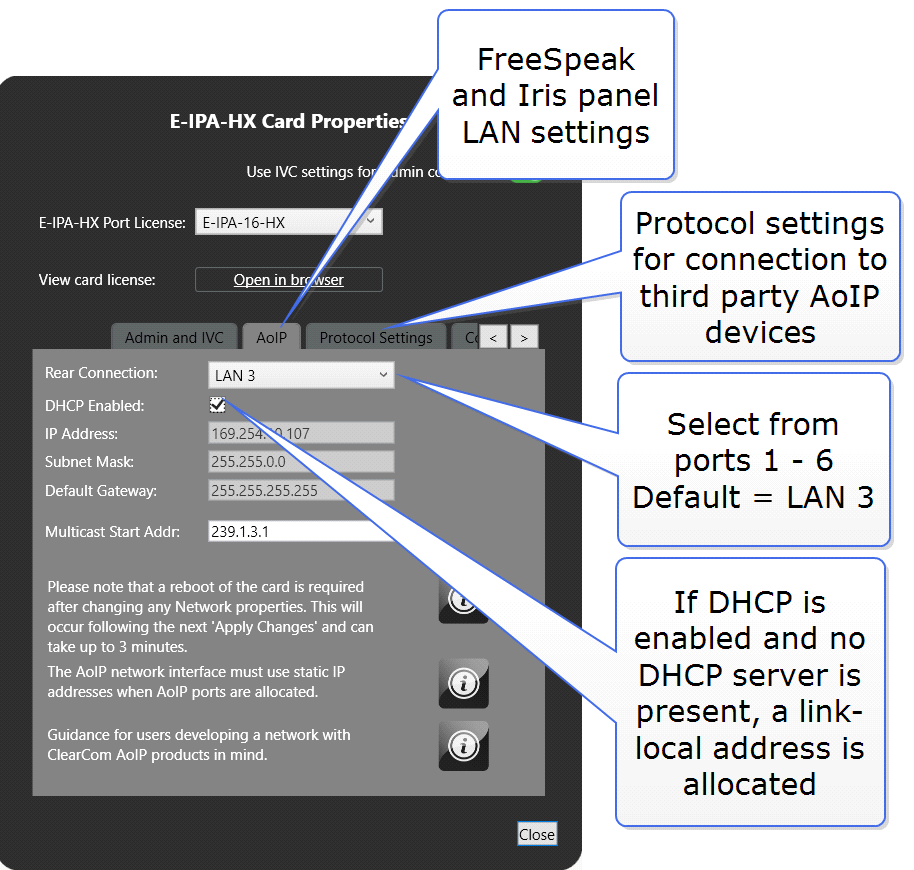
AES67 connections connections can be on ports 1-6 (RJ45 or Fiber). Default: LAN 3.
| Note: | When the IP address of the AES67 port changes, the E-IPA card automatically resets. |
-
Clear-Com recommends that AES67 ports are on a separate network from the Admin and IVC ports.
-
If you use more than three switches between the PTP master and the slave, Boundary or Transparent clocks must be used.
-
If the network contains only FreeSpeak and IrisX panels, DHCP can be enabled for the AoIP port.
-
When configuring an AES67 network, the network switch must have DiffServ Quality of Service (QoS) switched on.
-
Multicast support must be enabled.
-
Internet Group Management Protocol (IGMP) snooping must be switched on and there must be an IGMP querier on the subnet.
-
Switch ports bandwidth must be 1 Gbps and it is recommended that ports connecting switches are 10 Gbps.
Network setup for AoIP trunks and directs
When setting up these connections you must:
-
Set a static IP address for the AoIP LAN connector
-
Configure the card Protocol Settings