HBP-2X User Controls (Front and Side View)
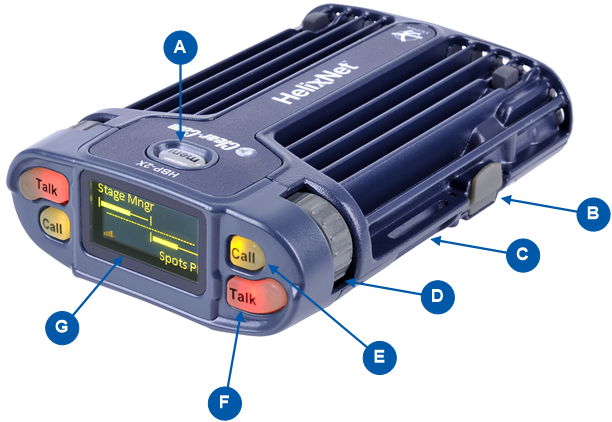
| Note: | The beltpack has two Keysets, each containing one Call button (E) and one Talk button (F). |
|
Key to HBP-2X user controls (front and side view) |
|
|---|---|
|
Feature |
Description |
|
|
Menu key. Press firmly to enter Menu mode (see also D,E ). To exit Menu mode, press the Menu key again. The display screen times out of Menu mode and displays the Channel label(s) if no key is pressed for 20 seconds. |
|
|
USB 2.0 (Micro-AB) connector. Used for the USB light flasher feature. See Call a beltpack using the USB flasher feature |
|
|
Casing. Metal casing for robust use. For information about the beltclip, beltloops, and feet, see HBP-2X beltclip, beltloops and feet |
|
Keyset |
|
|
|
Rotary control. Turn to increase and decrease the listen volume level for the Channel. In Menu mode, you can turn either of the side-mounted rotary controls to scroll menu items. To select (enter) items, press the right-hand Call key (see E ). |
|
|
Call key. Press to send a call signal to all Keysets assigned to the same Channel. There are two Call keys on the beltpack, one for each of the supported Channels. In Menu mode, press the right-hand Call key to select (enter) menu items (see also A, D ). Use the left-hand Call key to go back one menu level. |
|
|
Talk key. Press to talk to all nodes (intercom devices and systems) listening into the Channel. There are two Talk keys on the beltpack, one for each of the supported Channels. |
|
|
Display screen. When the beltpack is not in Menu mode, the labels and volume level for each of the two Channels supported by the beltpack are displayed on screen. For a full description of the display screen information, see Main Station Remote. |
|
|
Note: The beltpack has two Keysets, each containing one Call button (E) and one Talk button (F). |


