We'd value your feedback. Click here...
Configure a Stacked Key on a Beltpack using the CCM
You can configure stacked keys on a beltpack, putting two or more Channels on the same key. This enables the beltpack user to talk and listen to two groups simultaneously. Pressing the Talk or Call button on the beltpack will initiate a talk or call to all the Channels on the stacked key. If any Channel user activates a call to the beltpack, the Call label will flash and vibrate if enabled.
Beltpack stacked keys can only be configured through the Core Configuration Manager (CCM).
To configure a stacked key on a beltpack:
-
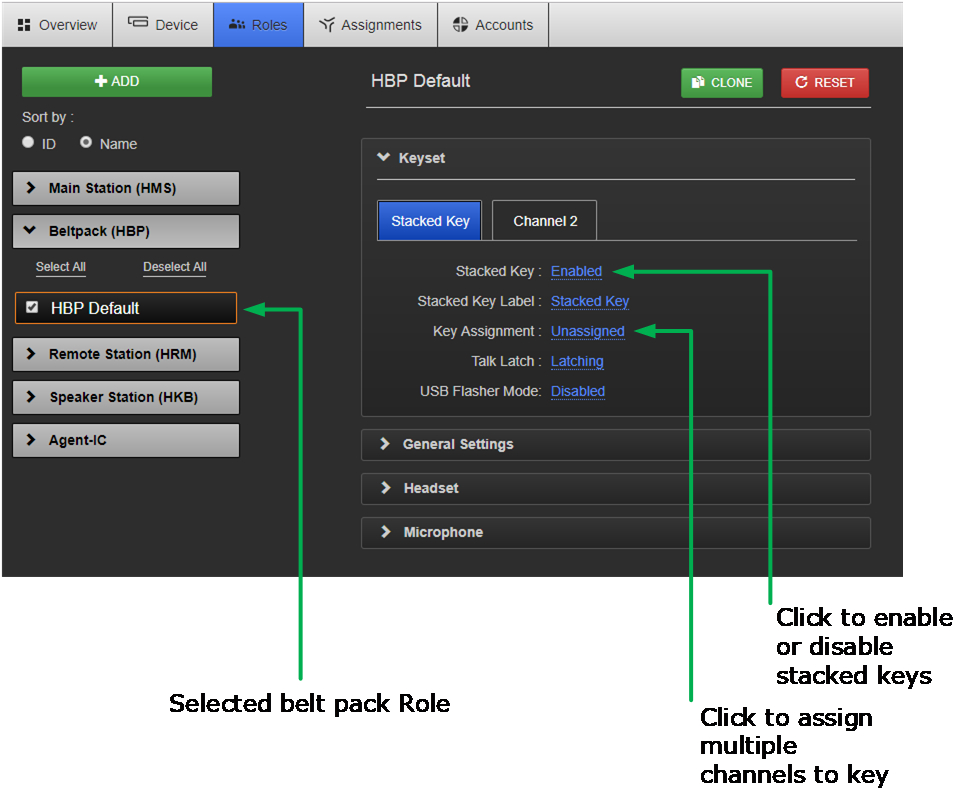
Navigate to Roles >Beltpack (HBP) > Role > Keysets and select the Channel Tab you wish to stack a key on.
-
Click the Stacked Key checkbox. This automatically unassigns any Channels already on this Keyset.
-
Click Key Assignment
-
Select all the Channels you wish to assign to the Keyset. Click Done. The Channels will be stacked on the Keyset.
-
Set the Talk Key as required.