We'd value your feedback. Click here...
Linking Two Main Stations over LAN
-
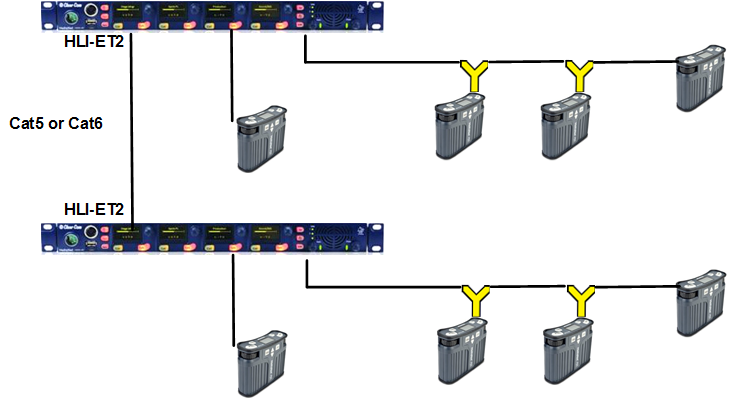
Insert an HLI-ET2 Ethernet interface module in each station. Use any of the three slots available.
Note: Ensure that the Main Station is powered down before inserting modules.
-
Connect a regular Ethernet cable (for example, CAT5, CAT5e, CAT6, CAT6e) from one HLI-ET2 port on one station to one HLI-ET2 port on the other station.
-
Power up both stations. Verify that the green LED on each HLI-ET2 port is flashing.
-
On one HMS go to Networking->Linking->Link Mode menu and select Master.
-
On the other HMS go to Networking->Linking->Link Mode and select Member. Then in Networking->Link to Master select the Master HMS you identified in the previous step.
Note: In HelixNet 3.0 or later each Main Station has 12 Channels. Linking Main Stations will have the effect of giving you more I/O and module options.
Notes In HelixNet 3.0 or later each Main Station has 12 Channels. Linking Main Stations will have the effect of giving you more I/O and module options. You should see a Link icon on the Main Station display: