
We'd value your feedback. Click here...
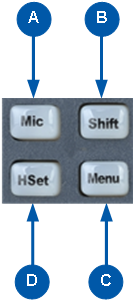
Speaker Station Front Panel Function Buttons
|
Key to Speaker Station front panel function buttons |
|
|---|---|
|
Feature |
Description |
|
|
Mic control [MIC ON]. Press to activate mic audio. |
|
|
Shift key. Press to display two alternative Channels on the Speaker Station displays. |
|
|
Menu. Press to display the Speaker Station menus in the display screens. Use the rotary control for each display screen to scroll and select menu items. |
|
|
Headset key [HSET]. Press to activate the headset mic. When the headset is connected, the gooseneck microphone is disconnected. Audio output to the loudspeaker is diverted to the headphones. |


