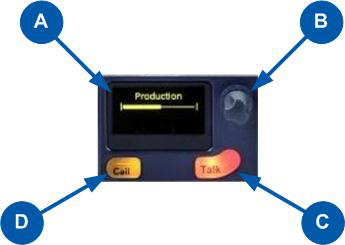
HMS-4X Main Station Keyset and Display
|
Key to |
|
|---|---|
|
Feature |
Description |
|
|
Display screen. There are multiple screensaver options. If the Rotary controls are touched, this screen also displays the sound level on the Channel (controlled by the rotary) and the system information icons. See the next table for an explanation of system information icons. In Menu mode, the display screens display the four levels of menu. The menu hierarchy proceeds left to right:
If the display is in Menu mode, the display screen times out of Menu mode and displays the Channel label if no key is pressed for 20 seconds. For more information about Menu mode, see Using the Menus |
|
|
Rotary control. Turn to increase or decrease the listen volume level for the Channel. Also, push the control to mute or unmute audio level. In Menu mode, use the control to scroll menu items. To select menu items, press the control. |
|
|
Talk key. Press to talk on the Channel and to all nodes (intercom devices and systems) listening into the Channel. |
|
|
Call key. Press to send a call signal to all nodes (intercom devices and systems) listening into the Channel. |


| Note: | If the |
|
|
|
|
|---|---|---|
|
Name |
Icon |
Description |
|
Channel label |
|
A descriptive name for the Channel. The maximum length is 10 characters. |
|
Channel listen volume level |
|
The volume of the Channel audio. |
|
Link with another HMS |
|
Appears on the Main Station when linking is enabled. |
|
Not linked |
|
Appears on the Main Station when a connection to another Main Station is lost. |
|
Paired |
|
Appears on the Remote Station and Speaker Station when it is connected properly over LAN. |
|
Not paired |
|
Flashes on the Remote Station and Speaker Station when the connection is not configured properly. |
|
Signal strength |
|
Appears on the Remote Station, Speaker Station and beltpack. One to five bars indicate the strength of the signal. |
|
Locked |
Locked |
Appears on the beltpack when you try to access the menu while the menu has been locked. |
|
Mute |
|
Appears on the |
|
Opto (GPI) |
|
Appears on the |
|
Relay (GPO)/Logic Output Option |
|
Appears on the |
|
Program |
PGM |
Appears on the |
|
IFB |
IFB |
Appears on the |
|
2W/4W |
2W/4W |
Appears on the |
|
Limiter |
LIM |
Appears on the |
|
Expansion |
|
Appears on the |
|
Warning |
|
Appears on the |