AoIP interconnectivity
For an AES67 type connection (AoIP), use an E-IPA-HX interface card.
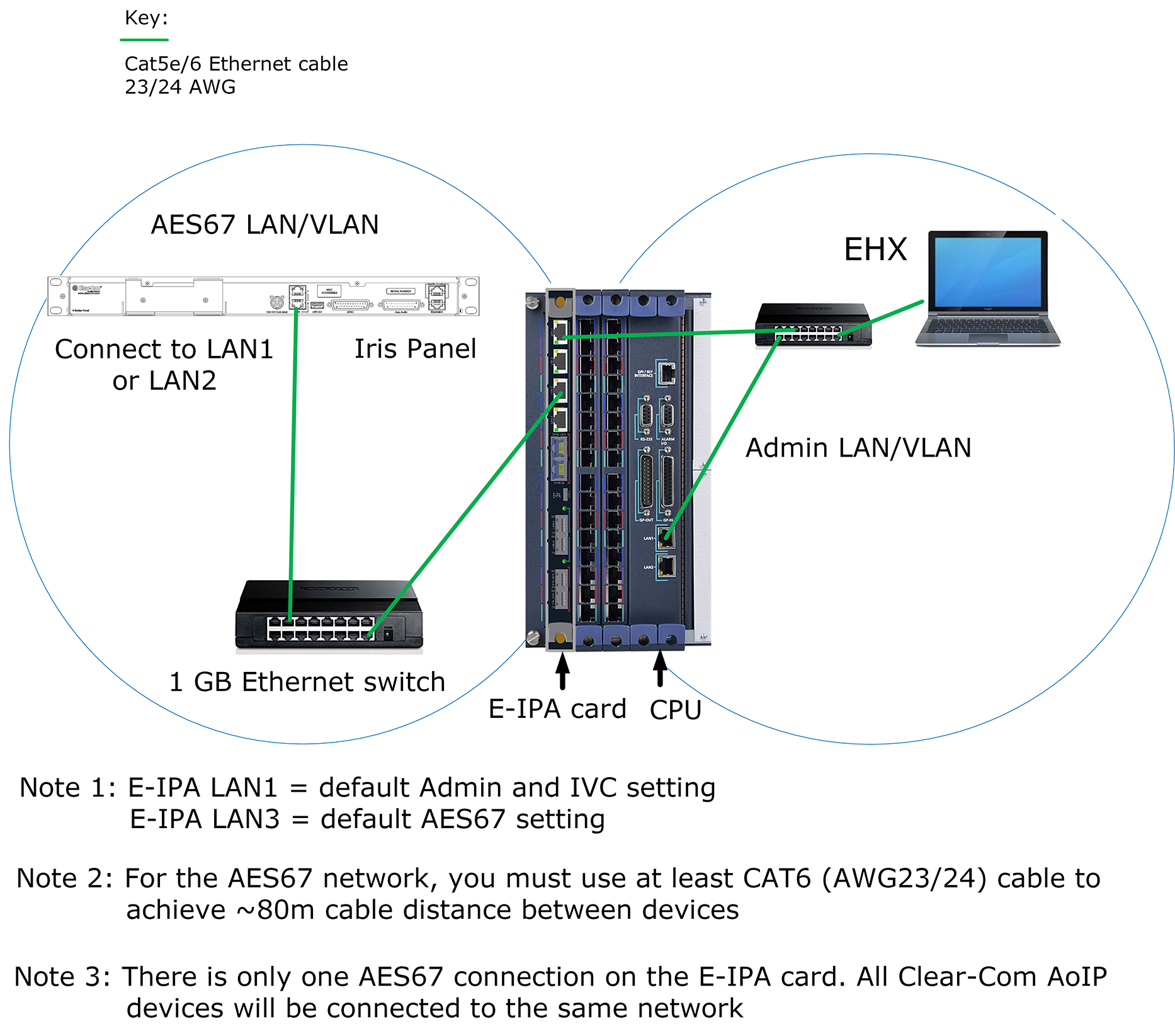
- Cable devices as shown
- Check the settings on the switch used for the AES67 network
- Configure the EHX software
- Add port
- Select panel type
- Select connection type (AoIP) in panel properties
- if necessary, check IP settings on the E-IPA card (navigate to Cards and Ports > E-IPA Card Properties)
- Initiate the connection between the Iris panel and the matrix
- Use the device discovery feature or
- Insert the mDNS name of the panel (printed on the panel rear) into EHX in panel properties
- In both cases Apply Map to Matrix to start the connection process
- Monitor the connection process in the Iris panel screens or EHX Monitoring. Also check the Event Log as necessary.
- Cable your devices as shown above (example set up). Note that Admin and AES67 are on separate subnets. The default IP setup is DHCP.
- Check the settings on the switch used for the AES67 network:
- 1 GB minimum
- DiffServe QoS
- IGMP v2 + querier (1 querier per network)
- AES67 PTP profile (for PTP aware switches)
- Configure the EHX software.
- Open the EHX software and navigate to Hardware > Cards and Ports
- Click on the E-IPA card to select it
- Add a port using the green + port button
Set the port function : click Port Function, then select the type of panel you have from the dropdown list
At this point, you have the option of adding up to two auxiliary audio channels (hosted directs)
- Set Connection Type to AoIP in Port Properties> IP Port Options
Any auxiliary audio channel (hosted direct) that has a parent port in AES67 (AoIP) mode will also be in that mode.
- Initiate connection between the IP panel and the matrix. There are two possible connection methods: using the mDNS name of the panel (found on the device rear), or using the device discovery feature.
After you have applied the map to the matrix, the connection process will begin. You will see Eclipse connection up displayed in the panel menu display screens when a data connection is made. Wait a few minutes for the audio routes to connect and for any keys you have configured to appear on the panel keysets.
Monitor the connection process in the Iris panel screens or EHX Monitoring. Also check the Event Log as necessary.
 Overview