Speaker Station
Speaker Station Front Panel
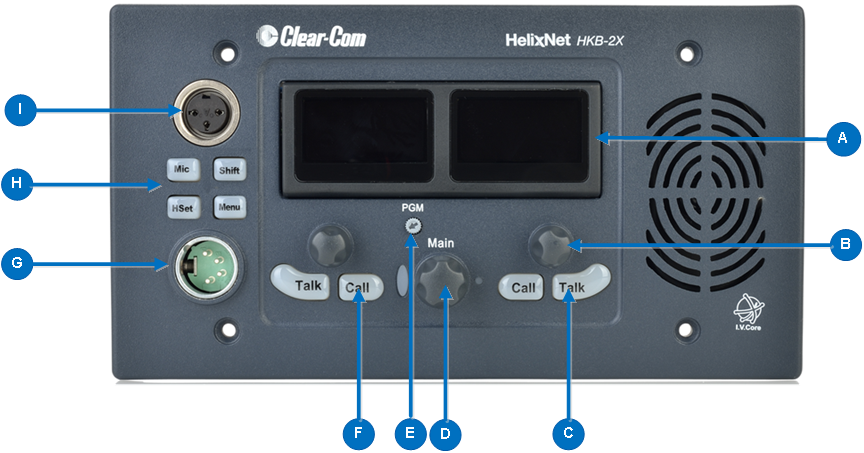
|
Key to Speaker Station front panel |
|||||||||||
|---|---|---|---|---|---|---|---|---|---|---|---|
|
Feature |
Description |
||||||||||
|
|
Tilt adjustable display screen. The following default information is displayed:
In Menu mode, the display screens display the two levels of menu. The menu hierarchy proceeds left to right:
If the display is in Menu mode, the display screen times out of Menu mode and displays the Channel label if no key is pressed for 20 seconds. For more information about Menu mode, see Using the Menus |
||||||||||
|
|
Rotary control. Turn to increase or decrease the listen volume level for the Channel. Also, tap the control to mute or unmute audio level. In Menu mode, use the control to scroll menu items. To select menu items, tap the control. |
||||||||||
|
|
Talk key. Press to talk on the Channel and to listen to the Channel. |
||||||||||
|
|
Loudspeaker / Headphone audio level rotary control [Main]. To increase the volume to the loudspeaker / headphones, turn clockwise (up to 360°). To decrease the volume, turn counter clockwise (up to 360°). As you increase or decrease the volume, the level control LEDs pass through a range of indicator colors. |
||||||||||
|
|
Program feed audio level Trim Pot control [PGM]. To increase the volume of the program feed to the loudspeaker / headphones, turn clockwise (up to 360°). To decrease the volume, turn counter clockwise (up to 360°). To mute or unmute the Channel audio, tap the control. |
||||||||||
|
|
Call key. Press to send a call signal to all Keysets assigned to the same Channel. There are two Call keys on the beltpack, one for each of the displayed Channels. |
||||||||||
|
|
Headset socket (4-pin XLR–M)
|
||||||||||
|
|
Headset/microphone key Selects between headset and gooseneck microphone inputs. MIC Enables the selected microphone input to the channels on the station with active Talk keys. |
||||||||||
|
|
Gooseneck microphone connector (3-pin female Tuchel connector) |
||||||||||


